






















Javascript is not enabled.

Javascript must be enabled to use this site. Please enable Javascript in your browser and try again.

Skip to content
Content starts here
CLOSE ×
Search
CLOSE ×
Search
Leaving AARP.org Website

You are now leaving AARP.org and going to a website that is not operated by AARP. A different privacy policy and terms of service will apply.

One Quick Trick to Lock In Cheap Airfare

Learn how to set a fare price alert in seconds to save time and money

a laptop with a text bubble that reads new fare alert with an airplane on the screen
Setting a fare alert is a quick and easy way to find the cheapest fare possible, without spending your time stalking flights.
AARP (Getty Images, 2)

I’m always surprised when my fellow dedicated travelers don’t grasp the financial and emotional payoffs of setting a fare alert. It’s the first thing I do when the idea of a trip takes root, even if my travel dates or location are still up in the air.  

Case in point: My longtime fellow Gen X travel buddy, Konnie Gurung, recently mentioned that she was about to start stalking airlines to find a low fare to Chicago. And really, who doesn’t want a low fare? Especially if you’re on a fixed budget, as many older adults are. Set a fare alert, I insisted. Again. It takes minutes, and then the stalking is done for you — a major time- and stress-saver. You receive an email updating you on price changes. Some even advise when it’s time to buy. 

There are numerous platforms where you can set fare alerts, including:

  • Travel credit card providers
  • So-called OTAs (online travel agencies) such as Expedia, Hotwire and Priceline (if you sign up for its free VIP program)
  • Flight search engines like Google Flights, Skyscanner and Hopper, which allow you to book flights directly with airlines (and thus retain direct-booking protections). 

The pros know. Patti Morrow, who writes about boomer travel on the website Luggage and Lipstick, says fare alerts are one of her top tactics for finding cheap flights. “It’s a good way to find out if the prices have dropped without being on the airline website every day,” says Morrow.

Kyle Potter, executive editor at Thrifty Traveler, likes to set an alert after purchasing a flight. “Let’s say you book a $500 flight and you’re like, ‘Well, this is OK, but I wish it was better,’ ” he says. “You set a Google Flights price alert, and then you get an email that says, ‘Oh, this dropped to $400.’ You’re not stuck, so long as you didn’t book the cheapest Basic Economy fare [which typically limits changes and cancellations].… You could rebook that flight and then pocket that $100 difference.”

Personally, I feel sufficiently backed up when I set the alert through my travel credit card provider’s booking portal. It tells me when to buy and includes price-drop protection. This means it automatically refunds the price difference of up to $50 in the form of a travel credit if the fare drops lower within 10 days. It’s happened before, and it’s a nice surprise.  

As my conversation with my friend illustrates, knowing it’s helpful and easy to do, and actually doing it, are two different things.

Here’s a simple airfare price alert how-to, designed to hit the “easy” part home.

I’ll illustrate with Google Flights, an accessible favorite among the pros I speak with regularly. Most of the others follow a similar format.

a laptop with google flights on the screen
Step One: Navigate to Google Flights.
AARP (Getty Images, Google)

1. Go to google.com/travel/flights.

a laptop with a calendar for searching for flights on the screen
Step Two: Add flight information and search.
AARP (Getty Images, Google)

2. Add your flight information (number of travelers, flight class, departure and destination cities, departure and return dates). If you’re flexible on dates, use your best guess as a starting point. When you choose dates, you’ll get a peek into which days are currently the cheapest to fly. Click Search.

a laptop with filters highlighted for searching for flights on the screen
Step Three: Focus your search.
AARP (Getty Images, Google)

3. Review the details. You can use the filters on this page, including stops, airlines, bags and more, to instantly further focus your search.

a gif of a laptop with a date grid and price graph for searching for flights on the screen
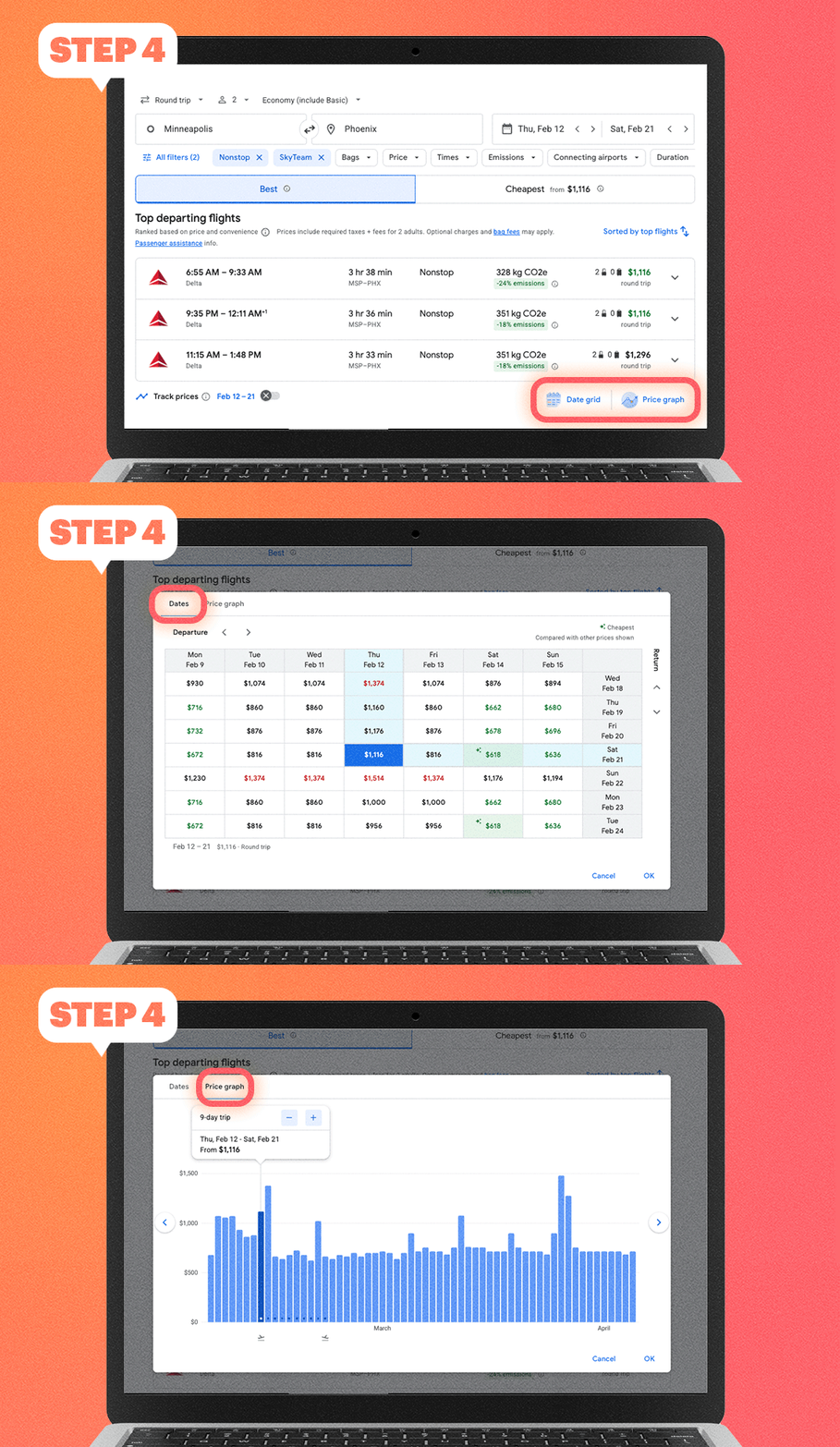
Step Four: Explore other features.
AARP (Getty Images, Google)

4. If you like, explore some of the additional features that help you decide on flight timing, including:

  • Date Grid: Day-to-day fare changes
  • Price Graph: Future fare options
 a laptop with a track prices toggle on the screen
Step Five: Set fare alert.
AARP (Getty Images, Google)

5. Scroll down to Track Prices. Toggle the X to the right for either the dates you plugged in or “any dates,” if you have flexibility.

6. Congrats — your fare alert is set! You’ll receive regular email updates about fare changes. You can cancel the emails at any time. 

For what it’s worth, Gurung set the alert, booked the cheap flight and is motivated to do it again.

Honestly, it’s so easy. Like money in the bank.

Unlock Access to AARP Members Edition

Join AARP to Continue

Already a Member?

AARP Travel Center

Or Call: 1-800-675-4318

Enter a valid departing date

Enter a valid returning date

Age of children:

Child under 2 must either sit in laps or in seats:

Enter a valid departing date

Age of children:

Child under 2 must either sit in laps or in seats:

Enter a valid departing date

Age of children:

Child under 2 must either sit in laps or in seats:

Flight 2

Enter a valid departing date

Flight 3

Enter a valid departing date

Flight 4

Enter a valid departing date

Flight 5

Enter a valid departing date

+ Add Another Flight

Enter a valid checking in date

Enter a valid checking out date


Occupants of Room 1:


Occupants of Room 2:


Occupants of Room 3:


Occupants of Room 4:


Occupants of Room 5:


Occupants of Room 6:


Occupants of Room 7:


Occupants of Room 8:


Enter a valid departing date

Enter a valid returning date

Age of children:

Occupants of Room 1:

Age of children:


Occupants of Room 2:

Age of children:


Occupants of Room 3:

Age of children:


Occupants of Room 4:

Age of children:


Occupants of Room 5:

Age of children:

Age of children:

Child under 2 must either sit in laps or in seats:

Enter a valid start date

Please select a Pick Up Time from the list

Enter a valid drop off date

Please select Drop Off Time from the list

Select a valid to location

Select a month

Enter a valid from date

Enter a valid to date