Healthy You
The Pains of Modern Life
Today’s technologies may be the cause of some old-fashioned aches. Here’s how to stop them
MODERN technology is designed to keep us feeling comfortable. But even the most ingeniously designed gadgets can make our bodies cranky, especially if we spend too much time with them. If you’ve ever woken up with an odd pain in your back, hands or arms, there’s a good chance that modern technology could be playing a role. Here’s how to find the source—and some simple adjustments to keep your tech usage comfortable and pain-free.
THE SYMPTOM: Lower back pain
POTENTIAL CULPRIT: Your desk chair
Roughly half of American adults 60 and older complain of lower back pain.
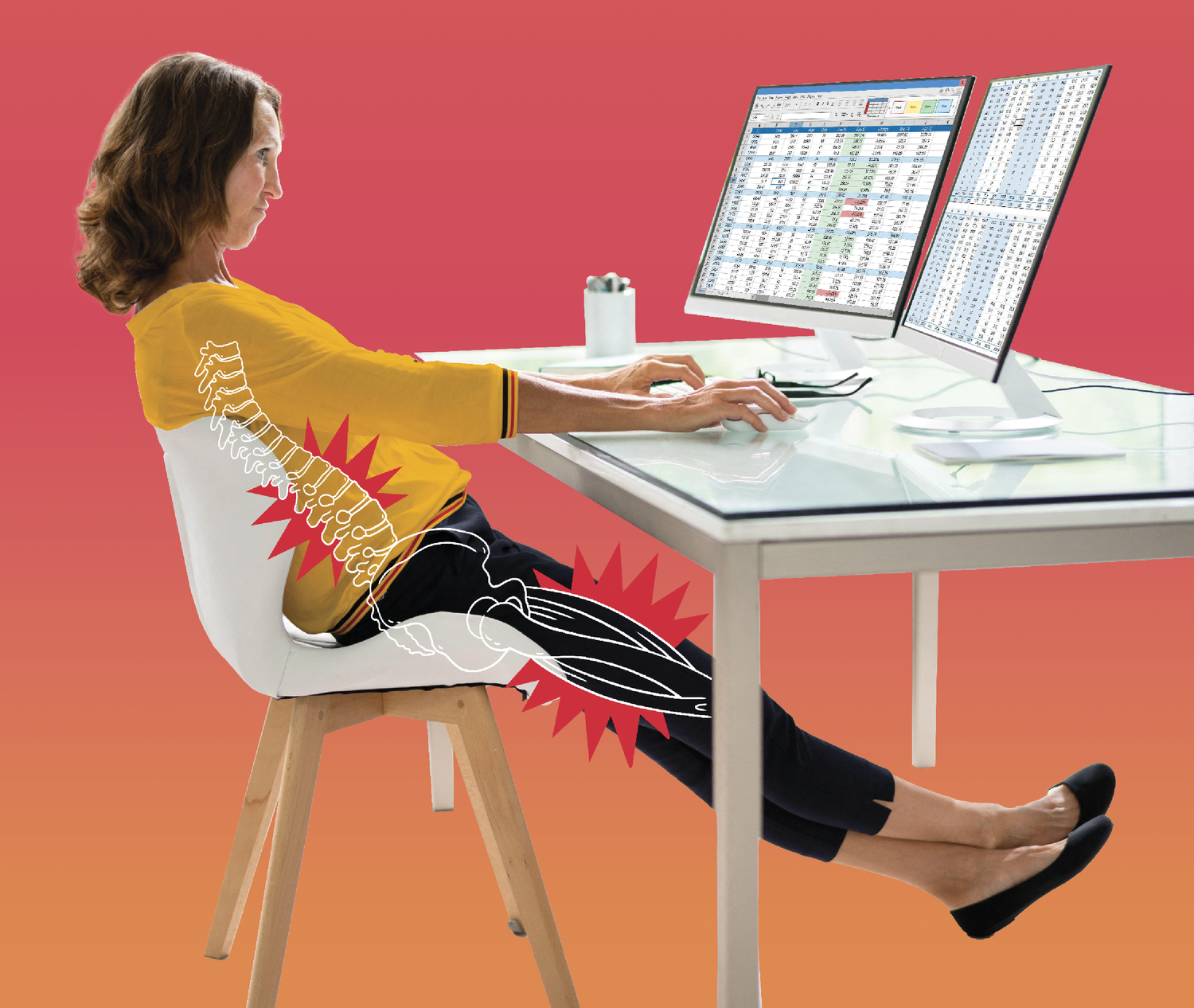
Back pain that lingers for 30 days or more means you should see a doctor to rule out any serious issues. But for a lot of us, that angry lumbar is driven by something simple: the way we sit. If you spend much of your day wedded to a desk chair or driver’s seat, how you sit is going to make an impact on how your back feels at the end of the day. And, if you’re like most people, you’re doing it all wrong, says Toronto-based chiropractor Michael Takes.
Here’s the problem: A lot of us were told as kids to “sit up straight.” For many of us, that means sitting in the middle of the chair or even close to the edge, with our feet firmly on the floor, back straight, head up. But that’s an unnatural position, and our muscles just aren’t strong enough to hold us up in that way for very long. Inevitably we begin to slouch: Our lower back relaxes and curves back as our shoulders curve forward. Instead of pointing down, the tailbone curls under and points toward the front of our seat. That stretches the spine and stresses the lower back muscles. Meanwhile, your hamstrings—the muscles running down the back of your thighs—are shortened. “That’s why a lot of people with lower back pain also have tight hamstrings,” says Takes. And tight hamstrings can tug on the hip bones and create additional stress. The result is lower back pain that stretches across the beltline and below it, Takes explains.
How to fix it: Instead of trying to “sit up,” push your buttocks to the very back of your chair so you’re wedged right up against the chairback and your pelvis is in a neutral 90-degree position. This facilitates proper alignment of your spine and eliminates unnatural stress on your tailbone and back.
THE SYMPTOM: Upper back, neck and shoulder pain
POTENTIAL CULPRIT: Your cellphone or computer

“Tech neck” is the term doctors have for the neck, shoulder and upper back stiffness caused by tilting your head down to look at a device for a long time.
“Leaning into screens most of the day affects the muscles that support the neck and pulls the neck forward,” says Dr. Jennifer O’Connell, a physiatrist at the Hospital for Special Surgery in New York City. While it’s not an official medical term, tech neck is becoming a more common ailment. Gen X Americans spend an average of four hours and 48 minutes a day on the phone; boomers spend four hours and 19 minutes per day, according to a 2025 survey from Harmony Healthcare IT.
The average adult head weighs 10 to 12 pounds. Bending it forward at a 45-degree angle to look at a device can load about 49 pounds of stress on the neck muscles, leading to fatigue, stiffness, headaches or even numbness or tingling in the arms and shoulders from pinched nerves. The same effect can happen if you regularly work on a laptop computer, which typically sits lower than the desktop devices of old.
How to fix it: It’s easy enough to say, “Look at your phone less,” but it’s hard to do: In the same 2025 survey, 51 percent of Gen Xers and 35 percent of boomers reported wanting to cut down their phone use.
If you just can’t stay off the phone, try using it in a way that causes less pain: Lift it in front of your face rather than keeping it down below your chin. As for laptops:
• Position your screen 20 to 30 inches away from your eyes.
• Use a computer monitor or laptop stand to raise the screen to eye level (a stack of books will also work).
• Keep your wrists straight and elbows at about a 90-degree angle.
• Keep your knees in line with your hips and your feet flat on the floor.
If the issue persists, consult a physical therapist, O’Connell advises.
THE SYMPTOM: Hand or wrist pain
POTENTIAL CULPRIT: Your smartphone
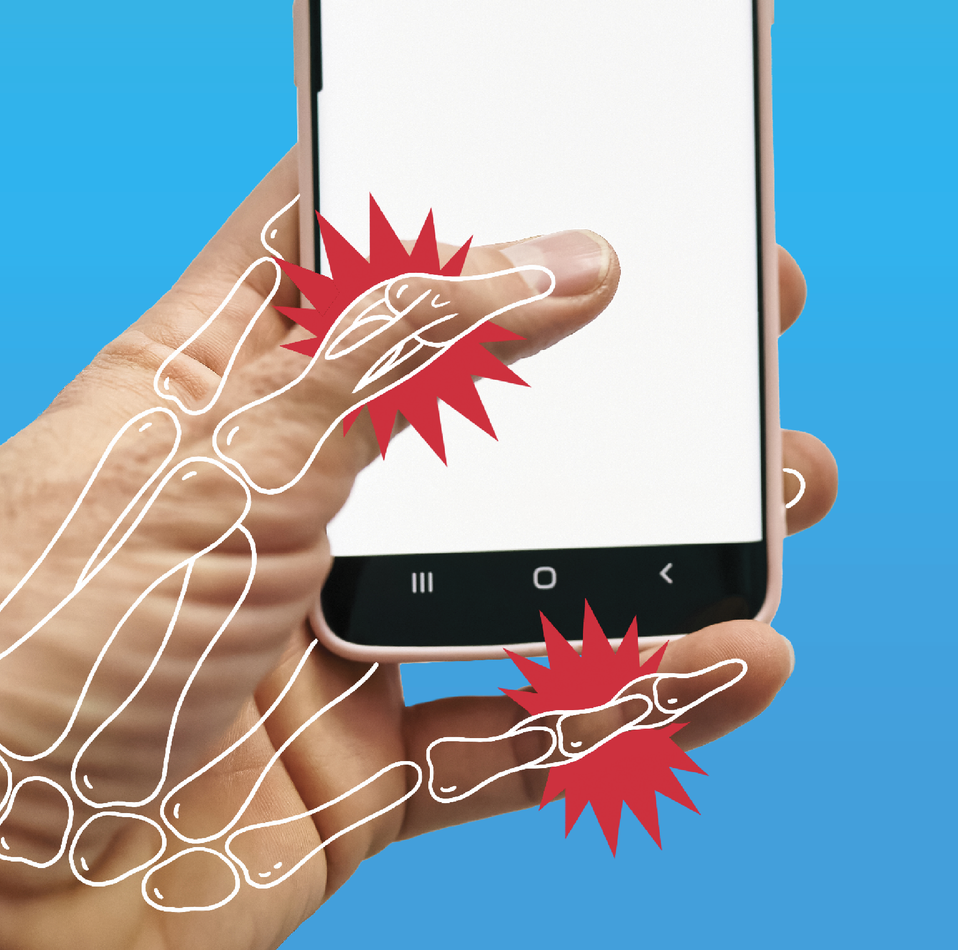
If you notice soreness or stiffness in your palm or wrist, especially near your thumb, there’s a good chance you’ve been doomscrolling too much. “I see a lot of overuse-related hand injuries from the repetitive activities that cause muscle and tendon stress and joint strains,” says Dr. Ariel Williams, assistant professor of orthopedic surgery and rehabilitation at the Yale School of Medicine. “They can cause tendinitis and aggravate conditions like arthritis from your hand being in the same position for a prolonged period of time.”
Commonly known as “text claw,” “smartphone thumb” or “phone hand,” these aches and pains result from stretching and overtaxing the tendons. Trigger finger is also common; it’s caused by inflammation or thickening of the sheath around a tendon that causes a finger or thumb to get stuck in a bent position or click and pop when moved. You can also injure your pinkie if you use it to support your phone as you scroll.
How to fix it: Switch hands regularly or, even better, use two hands—one to hold the phone and the other to scroll. Williams recommends using your index finger rather than thumb. And never use your pinkie to support your phone while scrolling.
Phone grips—accessories that adhere to the back of digital devices or cases to secure your grip for one-handed texting—can relieve pressure on your wrist and hand. Place it slightly below the center of your device for good balance and to allow your thumb to reach the screen on larger phones. This reduces the need for a tight grip on the phone and prevents wrist strain.
Jeanne Dorin McDowell writes about health for numerous national publications. She was a correspondent for Time magazine for 20 years.
8 Simple Ache-Easing Desk Moves
THE MORE you move, the more your body creates synovial fluid, the lubricant that helps prevent aches, pains and stiffness, says Brad Callan, an assistant professor of physical therapy at the Pacific Northwest University of Health Sciences. Here are some simple exercises Callan recommends that will help get the motion your body needs.
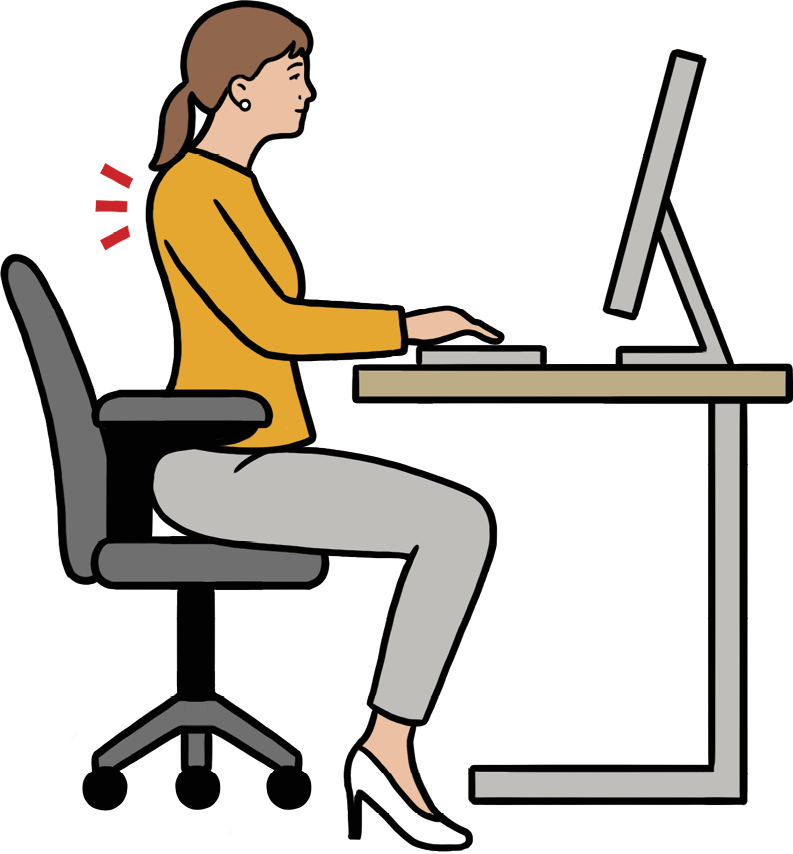
1. Shoulder straightening: Sit upright and squeeze your shoulder blades together to stretch your upper back. Keep your chin up and your ears and shoulders aligned.
2. Sitting hamstring stretching: While sitting, extend one leg out straight and lean forward from the waist over the leg to feel a stretch in the back of your extended leg.
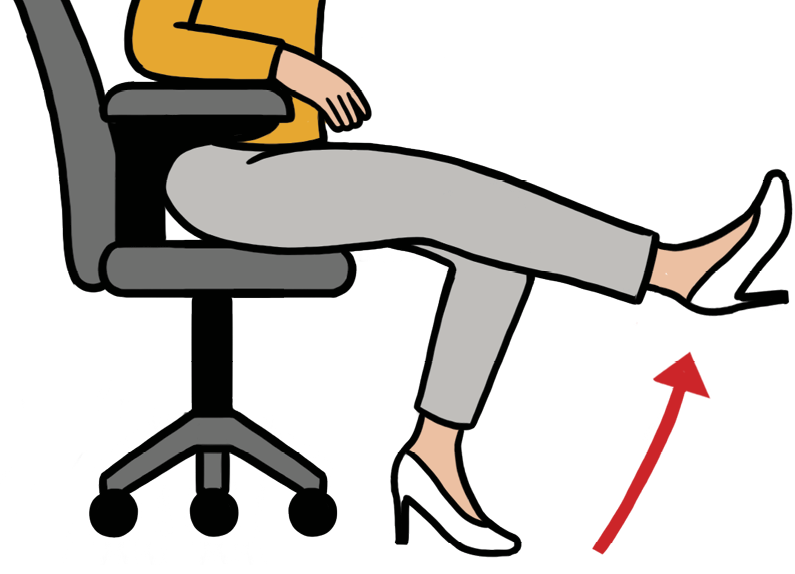
3. Seated leg extensions: Sit on the edge of your chair, lift one leg straight out and hold for two counts to activate shin and thigh muscles. Repeat 10 times for each leg.
4. Upper back stretch: Put your hands behind your neck and try to bring your elbows back behind you to relieve upper back stiffness.
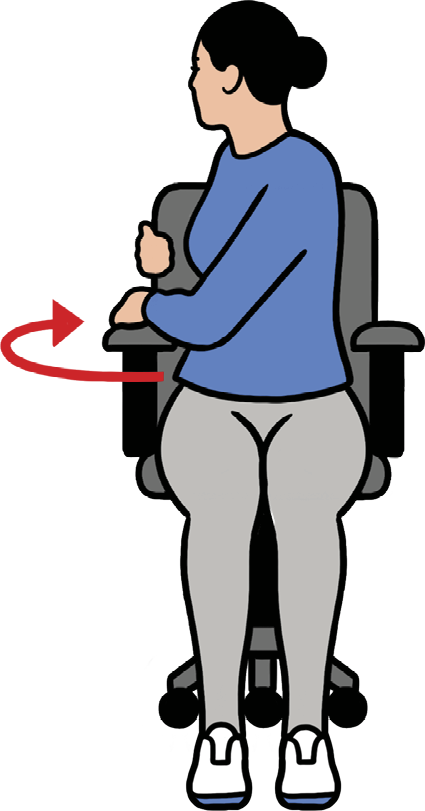
5. Sitting torso twist: Sit tall in your chair with your feet flat, then twist to the right while holding the chairback. Hold this position for a few seconds, then switch sides for spinal mobility.
6. Glute squeezes: Squeeze your glute muscles (your butt), hold for 10 sec-onds and release. Repeat 10 to 15 times.
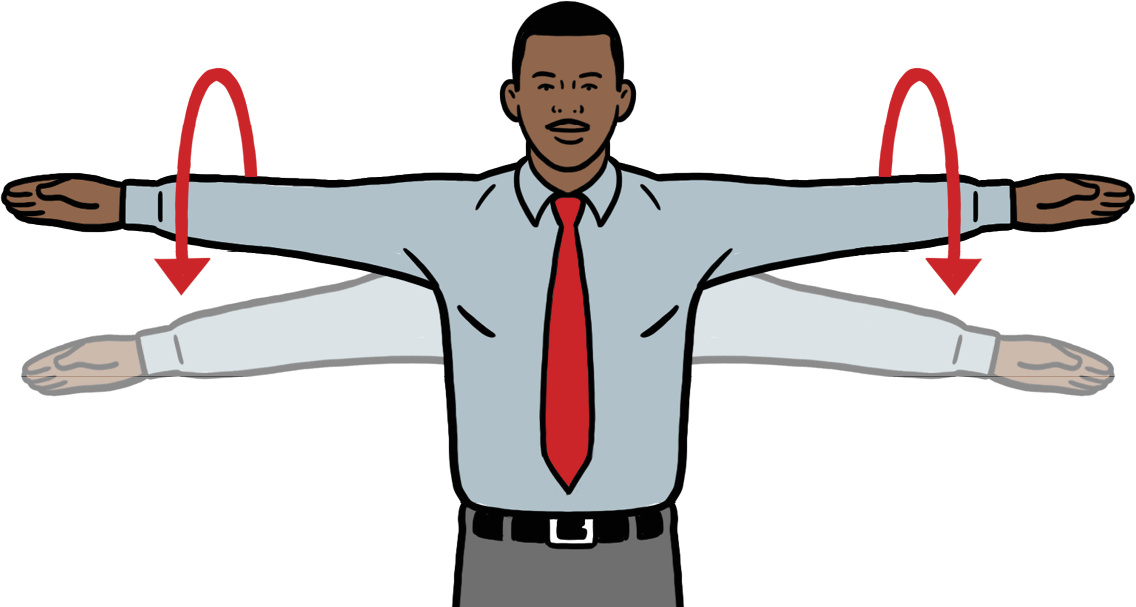
7. Arm circles: Extend your arms to the sides and make small circles forward and backward to work your shoulders.
8. Thigh presses: Press your palms against the outside of your knees and push inward with your hands while trying to push against them with your legs.